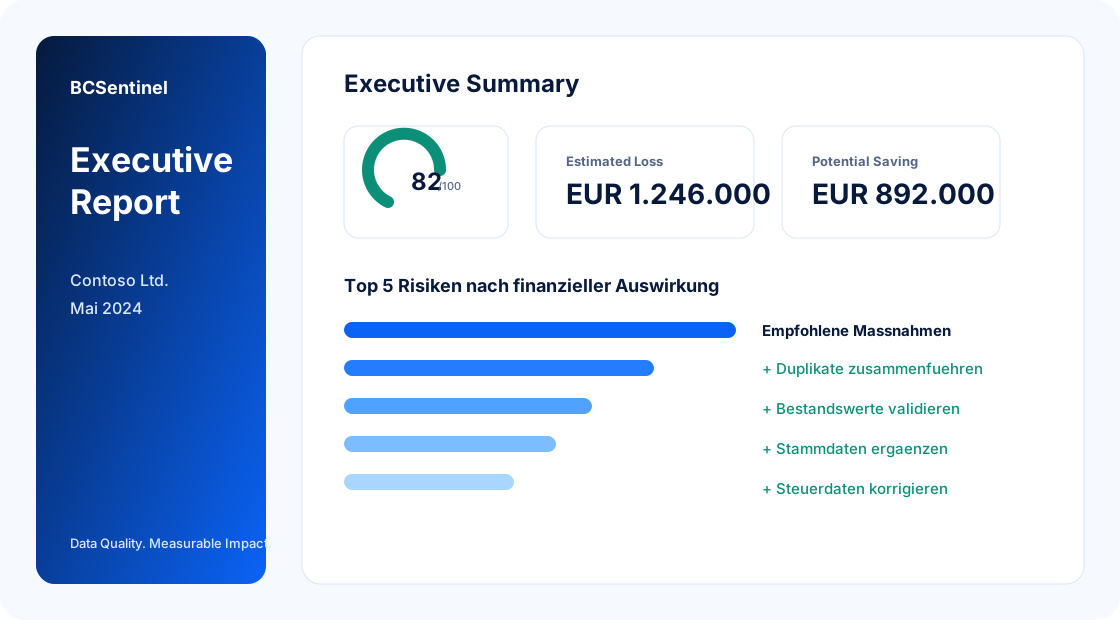
Your Business Central data is costing you money.

Detect data issues, quantify financial impact, and monitor your ERP health continuously - before poor data slows processes, creates rework, and drives avoidable losses.

Deep scan of your Business Central data Realistic annual loss and savings potential Continuous monitoring for critical data issues

See what poor data costs - and what fixing it can save.

Turn weak data quality into a financial conversation that supports prioritization, budget decisions, and internal buy-in.

Example: 18 pricing issues - 12 months - 15 minutes rework = EUR 2,835 annual avoidable cost.

Estimated Loss EUR 10,492

Estimated financial impact caused by detected data quality issues.

How is this calculated? See 5 examples
Potential Saving EUR 7,344

Realistic saving potential after resolving the most important issues first.

Most Business Central systems contain hidden data issues.

Missing master data, duplicate records, wrong prices, incomplete posting setups, and unresolved open documents quietly create friction across sales, purchasing, finance, and operations.

Missing mandatory fields in master data Pricing anomalies and inconsistent discounts Duplicate business records and contact data Old open documents and blocked ledger entries
01

Margin leakage

Wrong prices and discount mismatches quietly reduce contribution margin.

02

Manual rework load

Teams spend recurring effort on corrections, follow-ups, and data cleanup.

03

Operational delays

Blocked transactions and unresolved documents slow execution across departments.

04

Decision risk

Low-quality data distorts KPIs, forecasts, and management decisions.

Bad data is not just annoying. It is expensive.

Lost revenue

Wrong prices and discounts reduce margin.

Manual rework

Teams spend time fixing avoidable data errors.

Process delays

Incomplete setups block transactions and approvals.

Wrong decisions

Low-quality data distorts reports and KPIs.

Show management a real business case - not just a data list.

BCSentinel connects technical findings with financial relevance so weak data quality becomes visible in euros, priorities, and measurable improvement potential.

  • Clear Data Health Score for a fast executive overview
  • Estimated annual loss and realistic savings potential
  • Issue categories and high-risk areas at a glance
  • Strong basis for recurring monitoring and purchase decisions

BCSentinel turns poor data into measurable clarity.

Run a full scan of your Business Central system and instantly see where your data quality is weak, how big the business impact is, and which areas deserve attention first.

Scan

Data Health Score

Get an immediate management-ready overview of the quality of your ERP data.

EUR

Financial impact in euros

Translate data quality problems into realistic economic relevance.

EUR

Issue categories

See which data areas and processes are most affected by weak quality.

-

Monitoring-ready structure

Build a strong basis for recurring scans and continuous data health monitoring.

From first assessment to ongoing monitoring.

Lightweight for the customer, powerful enough to create real ERP value from day one.

1

Assessment

Run one deep scan, receive one scan credit, and use seven days of dashboard, issue, and report access.

2

Clean up data

Use the findings, executive report, and recommendations to fix the most relevant Business Central data issues.

3

Validation Check

Run a follow-up scan after cleanup to validate progress and refresh dashboard, issues, and reports for seven days.

4

Monitoring

Move to monthly or annual monitoring when data quality should stay visible as Business Central changes.

Clear product prices for scan and monitoring.

Choose a one-time assessment start, a cleanup validation, or continuous monitoring.

Assessment

One-time data health assessment.

EUR 79 one-time
  • Deep scan and score
  • Business impact overview
  • Dashboard access window
Open in Business Central
Validation Check

Follow-up scan after cleanup.

EUR 49 one-time
  • Validation scan credit
  • Improvement comparison
  • Fresh executive view
Open in Business Central
Monitoring Annual

Annual monitoring with fixed yearly price.

EUR 990 / year
  • Recurring dashboard access
  • Issue details and recommendations
  • Business Central actions
Open in Business Central

Built for privacy-sensitive Business Central environments.

BCSentinel is designed to support privacy-first SaaS usage and to create trust in sensitive ERP contexts.

  • GDPR-conscious setup
  • Hosted on a German server
  • Privacy-first architecture
  • Clear separation between tenants

Your data stays protected.

Hosted in Germany, designed for GDPR-conscious businesses, and built with a focus on secure processing, tenant separation, and minimal exposure of sensitive ERP information.

Build recurring revenue as a BCSentinel partner.

Recommend BCSentinel to Business-Central customers and earn commission on eligible subscriptions.

What partners get

  • Commission on eligible monitoring subscriptions
  • Tenant-based referral attribution and tracking
  • Clear payout overview with status transparency
  • Sales-ready material for demo and onboarding

How it works

  • Get your partner code and referral link
  • Refer tenants and track their status in your portal
  • See commissions move from pending to approved and paid

Questions before your first scan?

What does BCSentinel analyze?

BCSentinel scans your Business Central data quality across key areas such as customers, vendors, items, finance, purchasing, sales, and process-related records.

Which data is transferred?

BCSentinel transfers tenant and company identification, metadata, configuration data, scan results, findings, and aggregated quality metrics needed for the analysis.

Are API tokens used in reports or URLs?

No. API tokens should not appear in reports or URLs. Dashboard embed uses short-lived embed tokens, and report share links use expiring links.

What is a scan credit?

A scan credit allows one paid deep scan. Assessment and Validation Check each include one scan credit.

What is the difference between Assessment and Validation Check?

Assessment is the first deep scan. Validation Check is the follow-up scan after cleanup to confirm progress and refresh the report view.

When does monitoring make sense?

Monitoring makes sense when data quality should be checked continuously, for example after an initial cleanup or for business-critical processes.

How long do I have access to dashboard, issues, and reports?

Assessment and Validation Check provide seven days of access. Monitoring keeps access active while the subscription is active.

Does BCSentinel work with Business Central Cloud?

Yes. BCSentinel is prepared for Business Central Cloud scenarios and does not require direct database access.

Is BCSentinel already live in Microsoft AppSource?

No. AppSource readiness is in preparation; the current flow is for pilot and direct customer onboarding.

See what your Business Central data is costing you before it gets more expensive.

Start your assessment scan, uncover hidden risks, and get a business-focused view of where weak data quality is already creating avoidable cost.

Start with Assessment, validate improvements, and move to Monitoring when continuous control is needed.